★★★★★
"Je gère 12 comptes IG. Je passais toute ma matinée à faire des reels. Maintenant j'en exporte 50+ en 10 minutes et je passe le reste de ma journée sur la strat. L'outil s'est payé dès le premier jour."
Arrête de passer des heures sur CapCut. ClipFusion mixe tes vidéos brutes avec des captions virales extraites à l'IA — exporte des dizaines de vidéos uniques directement sur ton PC ou Mac.
Couper, replacer, ajouter caption, exporter, recommencer. Demain pareil. Après-demain pareil. Pendant ce temps, tes concurrents publient 10× plus que toi.
5 modèles, 20 reels/jour chacun. Tu répètes la même édition 100× par jour. Tes éditeurs claquent. Tes modèles se plaignent. Tu satures.
Pour A/B tester un hook, il te faut 30 variantes. Tu les fais une par une. Pendant ce temps, ta data est obsolète et l'algo TikTok a changé.
Tu sais que la fréquence fait l'algo. Mais tu rentres du taf épuisé. Tu n'as pas 3h à cramer chaque soir. Résultat : tu postes 3×/semaine au lieu de 3×/jour.
Drop your videos, let AI extract the captions, mix everything automatically. In minutes, not hours.
Drop videos here
Pas de feature gadget. Pas de cloud à attendre. Juste un outil qui tourne sur ta machine et te rend tes 3 heures par jour pour faire autre chose que de l'édition répétitive.
Drop des screenshots TikTok ou Reels. Gemini sort le texte ET le style (font, taille, couleur, position) automatiquement. Tu n'as plus jamais à retaper une caption.
FFmpeg local multi-thread sur ton CPU. Tu lances avant de te coucher. Tu te réveilles avec 150 reels uniques prêts à publier sur la semaine.
Le seul outil qui te laisse construire tes propres templates. Build une fois, automatise pour toujours. Personne d'autre n'a ça.
Tes vidéos ne quittent jamais ta machine. Pas de fuite. Pas de RGPD. Pas de risque de leak. Tes contenus sensibles restent chez toi.
Interface en 3 langues. OCR captions supporté dans 30+ langues. Tu vises le marché LATAM, US ou EU — ça marche.
Submagic te facture par minute. Opus.pro a une queue de 30 min. ClipFusion ? Ton CPU, illimité, jamais d'attente.
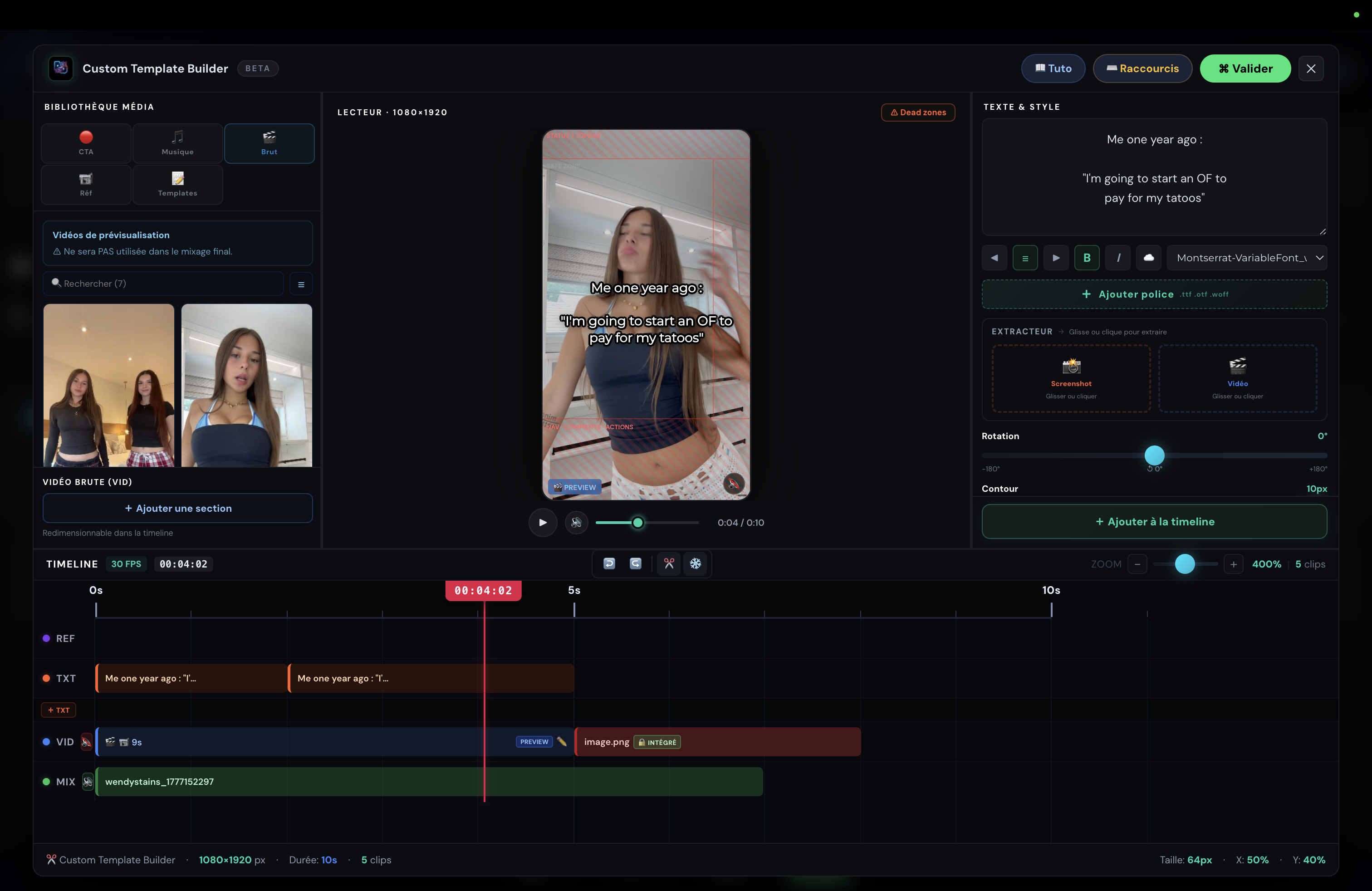
Tu construis exactement le template qui matche ta DA. Empile tes calques de texte, places tes CTA, choisis ta musique — sauvegarde-le une fois, et applique-le à des centaines de mixes différents pour démultiplier ta production sans perdre ton identité.
Même qualité. 100× moins d'effort.
Benchmark réel : 20 reels uniques avec captions + emojis exportés en moins de 4 minutes.
"Je gère 12 comptes IG. Je passais toute ma matinée à faire des reels. Maintenant j'en exporte 50+ en 10 minutes et je passe le reste de ma journée sur la strat. L'outil s'est payé dès le premier jour."
"L'extraction de captions m'a bluffé. J'ai déposé un reel viral, il a lu le texte parfaitement — emojis et tout. Mixé avec mes clips, 20 vidéos uniques prêtes à poster. En 3 minutes."
"Avant ClipFusion je postais 3 reels par jour et j'étais cramé. Maintenant j'en fais 20 sur 8 comptes et j'ai fini avant midi. Mon reach a fait ×5 en un mois."
On a fait le calcul pour toi. Spoiler : €147 / mois, c'est moins qu'une journée de travail du moins cher des freelances.
Pas de tier confus. Tu testes 3 jours gratuit. Si ça te plaît, tu passes Pro.
Vidéos illimitées · tous les templates · CTB · updates à vie
Tu économises 100€ chaque moisAnnulable à tout moment · Stripe sécurisé
Aucune carte requise · 15 vidéos d'essai · annulation en 1 click
Si tu as une autre question, on te répond sur Telegram en moins de 2h.